General
Settings
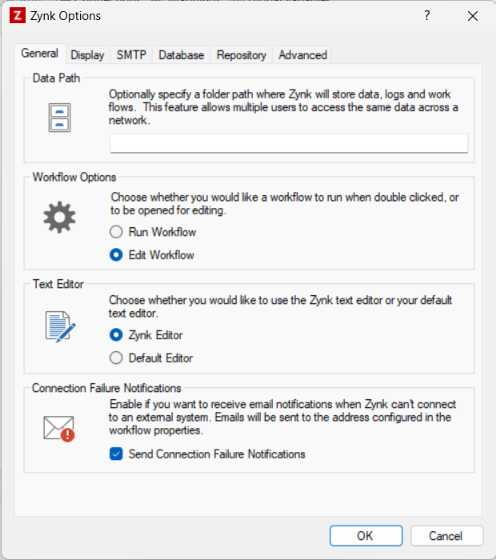
Please see below the settings you can configure on the general tab in Tools -> Options:
- Data Path - You can configure a custom data path to store your Zynk data. This may be helpful if your C drive is particularly full.
- Workflow Options - You can choose whether double clicking a workflow can trigger the workflow to run or be edited.
- Text Editor - You can optionally edit files with your preferred local text editor.
- Connection Failure Notifications - Optionally enable email notifications that are triggered when a connection fails to authenticate properly. E.g, if you are running maintenance mode in Sage 50 whilst trying to run Zynk you would receive a notification.
- Clear Cached Browser Data - This button clears all cached data from the embedded web browser, including cookies. The browser is used when you need to sign in to certain systems when creating/updating your connection details. If a previous login session is preventing you from signing in, clicking this button will resolve the issue.