Routes
A Route is a group of Agents that move one kind of data between two systems. For example, an Orders Route might have one Agent that collects orders from your store, and another that creates invoices in your accounting platform. Together, they make sure each order goes all the way across.
Viewing your Routes
On the Agents page or the Dashboard, click Routes to see your Agents grouped by Route.
Each Route shows the systems it moves data between, and how many of its Agents are healthy, for example 2/2 healthy. If any are unhealthy, open the Route to see which one needs attention.
Opening a Route
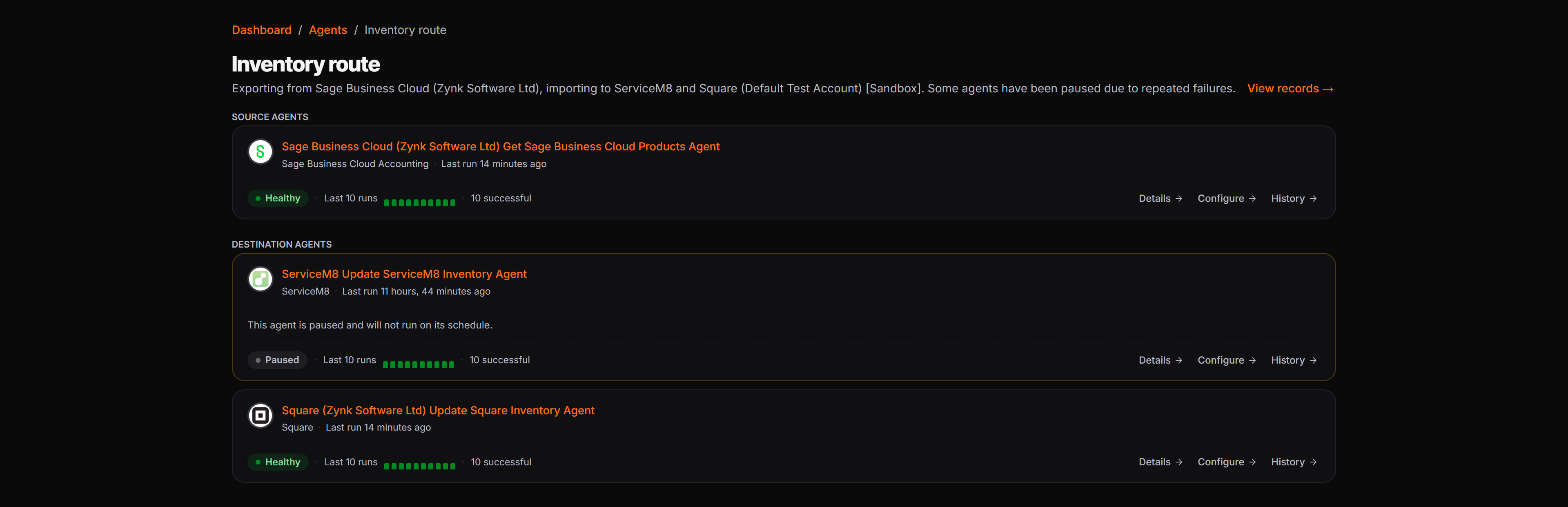
Click a Route to open it. Its Agents are split into two groups:
- Source - The Agents that collect data from a system, such as getting orders from your store.
- Destination - The Agents that send that data on, such as creating invoices in your accounting platform.
For each Agent, you can open its Details, see its History, or Configure its settings.
Incomplete Routes
If a Route only has Agents on one side, such as a source Agent with no destination, it shows as Incomplete route. Click complete it to add what's missing.
Finding a Route's records
To see everything a Route has moved, go to the Records page, open More and filter by Route.