Connecting to SugarAI
All of the tasks in the SugarAI connector require a connection to SugarAI, so you will need to create a connection with the type 'SugarAI'. See Managing Connections for instructions on creating a new connection. You will see a screen like the one below, requesting your SugarAI details:
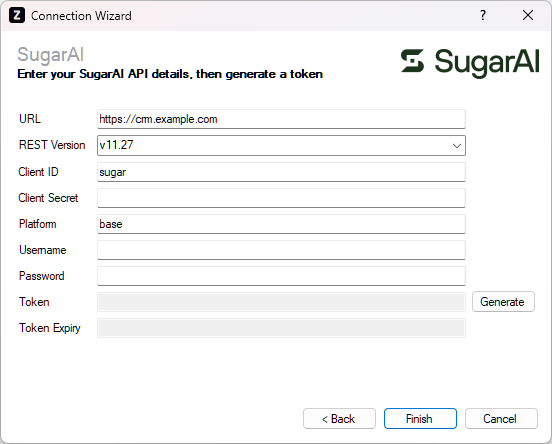
Enter your SugarAI details as described below, then click 'Finish' to create the connection.
Settings
URL
Required
Enter the address of your SugarAI system e.g. http://crm.example.com/.
REST Version
Required
Select the API version you want to target. This will depend on which version of SugarAI you are using, as shown in the table below. If you are using a version not listed below, please refer to the web services overview in the SugarAI developer documentation for your version of Sugar, then manually type in the version as shown in the 'REST URL'.
| Release | REST Version |
|---|---|
| 26.1.x | v11_27 |
| 25.2.x | v11_27 |
| 25.1.x | v11_26 |
| 14.2.x | v11_25 |
| 14.1.x | v11_25 |
| 14.0.x | v11_24 |
| 13.3.x | v11_23 |
| 13.2.x | v11_22 |
| 13.1.x | v11_21 |
| 13.0.x | v11_20 |
| 12.3.x | v11_19 |
| 12.2.x | v11_18 |
| 12.1.x | v11_17 |
| 12.0.x | v11_16 |
| 11.3.x | v11_15 |
| 11.2.x | v11_14 |
| 11.1.x | v11_13 |
| 11.0.x | v11_12 |
| 10.3.x | v11_11 |
| 10.2.x | v11_10 |
| 10.1.x | v11_9 |
| 10.0.x | v11_8 |
| 9.3.x | v11_7 |
| 9.2.x | v11_6 |
| 9.1.x | v11_5 |
| 9.0.x | v11_4 |
| 8.3.x | v11_4 |
| 8.2.x | v11_3 |
| 8.1.x | v11_2 |
| 8.0.x | v11_1 |
| 7.11.x | v11 |
| 7.10.x | v11 |
| 7.9.x | v10 |
| 7.8.x | v10 |
| 7.7.x | v10 |
Client ID
Required
Specify the client ID you want to connect to SugarAI with.
- The default value is
sugar. This will work in most cases, automatically creating an OAuth Key in the SugarAI which can be used for "password" authentication. - If you want to use an OAuth Key that has been created manually in SugarAI (under Administration > OAuth Keys), enter the associated client ID here.
Client Secret
Optional
Specify the client secret you want to connect to SugarAI with.
- If you are using
sugaras the client ID, leave this field blank. - If you want to use an OAuth Key that has been created manually in SugarAI (under Administration > OAuth Keys), enter the associated client secret here.
Platform
Required
Specify the platform you want to connect to. To avoid login conflicts with other clients, it is recommended to set up a dedicated platform for the integration to use.
- The default value is
base, which comes as a preconfigured platform in SugarAI. - If you want to use different value, make sure it is registered using the Platform extension or configure an API platform in the SugarAI administration panel.
Username
Required
Enter the username associated with the user you want to authenticate with.
Password
Required
Enter the password associated with the user you want to authenticate with.
This value is only needed during the token generation step, so it does not get stored by Zynk. Therefore if you ever need to generate a new token, you will need to enter the password again.
Token
Required
Click the 'Generate' button to generate a token that will grant access to SugarAI.
Token Expiry
Required
The date and time the token will expire is displayed here. It will automatically extend itself as the connection is used.